
234 lines
11 KiB
Markdown
234 lines
11 KiB
Markdown
# PowerShell Editor Services
|
|
|
|
[](https://github.com/PowerShell/PowerShellEditorServices/actions/workflows/ci-test.yml)
|
|
[](https://aka.ms/psdiscord)
|
|
[](https://gitter.im/PowerShell/PowerShellEditorServices?utm_source=badge&utm_medium=badge&utm_campaign=pr-badge&utm_content=badge)
|
|
|
|
**PowerShell Editor Services** is a PowerShell module that provides common
|
|
functionality needed to enable a consistent and robust PowerShell development
|
|
experience in almost any editor or integrated development environment (IDE).
|
|
|
|
## [Language Server Protocol](https://microsoft.github.io/language-server-protocol/) clients using PowerShell Editor Services:
|
|
|
|
- [PowerShell for Visual Studio Code](https://github.com/PowerShell/vscode-powershell)
|
|
> [!NOTE]
|
|
> PowerShell for Azure Data Studio will no longer be updated or maintained.
|
|
|
|
The functionality in PowerShell Editor Services is available in the following editor extensions:
|
|
> [!WARNING]
|
|
> These clients are community maintained and may be very out of date.
|
|
It is recommended to use a generic [LSP plugin](#Usage) with your client if possible.
|
|
|
|
- [lsp-pwsh](https://github.com/emacs-lsp/lsp-mode/blob/master/clients/lsp-pwsh.el), an Emacs PowerShell plugin
|
|
- [intellij-powershell](https://github.com/ant-druha/intellij-powershell), adds PowerShell language support to IntelliJ-based IDEs
|
|
- [coc-powershell](https://github.com/yatli/coc-powershell), a Vim and Neovim plugin
|
|
- [powershell.nvim](https://github.com/TheLeoP/powershell.nvim) a Neovim plugin
|
|
|
|
## Supported PowerShell Versions
|
|
|
|
PSES runs as a PowerShell Module in [currently supported versions of PowerShell 7+](https://learn.microsoft.com/en-us/powershell/scripting/install/powershell-support-lifecycle).
|
|
|
|
Windows PowerShell 5.1 is supported on a best-effort basis.
|
|
|
|
## Features
|
|
|
|
- The Language Service provides common editor features for the PowerShell language:
|
|
- Code navigation actions (find references, go to definition)
|
|
- Statement completions (IntelliSense)
|
|
- Real-time semantic analysis of scripts using PowerShell Script Analyzer
|
|
- The Debugging Service simplifies interaction with the PowerShell debugger (breakpoints, variables, call stack, etc.)
|
|
- The [$psEditor API](docs/guide/extensions.md) enables scripting of the host editor
|
|
- A full, Extension Terminal experience for interactive development and debugging
|
|
|
|
## Usage
|
|
|
|
If you're looking to integrate PowerShell Editor Services into your [Language Server Protocol](https://microsoft.github.io/language-server-protocol/) compliant editor or client,
|
|
we support two ways of connecting.
|
|
|
|
### Named Pipes / Unix Domain Sockets
|
|
|
|
If you're looking for a more feature-rich experience,
|
|
named pipes (AKA sockets) are the way to go.
|
|
They give you all the benefits of the Language Server Protocol with extra capabilities that you can take advantage of:
|
|
|
|
- The PowerShell Extension Terminal
|
|
- Debugging using the [Debug Adapter Protocol](https://microsoft.github.io/debug-adapter-protocol/)
|
|
|
|
The typical command to start PowerShell Editor Services using named pipes / sockets is as follows:
|
|
|
|
```powershell
|
|
pwsh -NoLogo -NoProfile -Command "./PowerShellEditorServices/Start-EditorServices.ps1 -SessionDetailsPath ./session.json"
|
|
```
|
|
|
|
The start script, `Start-EditorServices.ps1`, is found in the `PowerShellEditorServices` folder instead the `PowerShellEditorServices.zip` downloaded from the GitHub releases.
|
|
|
|
The session details (which named pipes were created) will be written to the given session details path,
|
|
and the client needs to point to these in order to connect.
|
|
|
|
The Visual Studio Code, Vim, Neovim, and IntelliJ extensions use named pipes.
|
|
|
|
### Standard Input and Output
|
|
|
|
Alternatively, the `-SessionDetailsPath ./session.json` argument can be replaced with just `-Stdio`.
|
|
The use of stdio is the _simplest_ way to connect with most LSP clients,
|
|
but will limit some features, such as the debugger and Extension Terminal.
|
|
This is because because these two features require their own IO streams and stdio only provides a single pair of streams.
|
|
|
|
Please see the [emacs-simple-test.el](test/emacs-simple-test.el),
|
|
[emacs-test.el](test/emacs-test.el),
|
|
[vim-simple-test.vim](test/vim-simple-test.vim) and [vim-test.vim](test/vim-test.vim) for examples of end-to-end tested configurations.
|
|
They use [eglot for Emacs](https://github.com/joaotavora/eglot) and [LanguageClient-neovim](https://github.com/autozimu/LanguageClient-neovim).
|
|
|
|
### Advanced Usage
|
|
|
|
If you are trying to automate the service in PowerShell, you can also run it under `Start-Process` to prevent hanging your script.
|
|
It also gives you access to process automation features like `$process.Close()` or `$process.Kill()`.
|
|
The `Start-EditorServices.ps1` script takes many more optional arguments, but they no longer _need_ to be specified.
|
|
|
|
```powershell
|
|
$command = @(
|
|
"$PSES_BUNDLE_PATH/PowerShellEditorServices/Start-EditorServices.ps1",
|
|
"-BundledModulesPath $PSES_BUNDLE_PATH",
|
|
"-LogPath ./logs",
|
|
"-SessionDetailsPath ./session.json",
|
|
"-FeatureFlags @()",
|
|
"-AdditionalModules @()",
|
|
"-HostName 'My Client'",
|
|
"-HostProfileId 'myclient'",
|
|
"-HostVersion 1.0.0",
|
|
"-LogLevel Trace"
|
|
) -join " "
|
|
|
|
$pwsh_arguments = "-NoLogo -NoProfile -Command $command"
|
|
$process = Start-Process pwsh -ArgumentList $arguments -PassThru
|
|
...
|
|
$process.Close(); #$process.Kill();
|
|
```
|
|
|
|
Once the command is run,
|
|
PowerShell Editor Services will wait until the client connects to the named pipe.
|
|
The `session.json` will contain the paths of the named pipes that you will connect to.
|
|
There will be one you immediately connect to for Language Server Protocol messages,
|
|
and once you connect to when you launch the debugger for Debug Adapter Protocol messages.
|
|
|
|
### PowerShell Extension Terminal
|
|
|
|
|
|
|
|
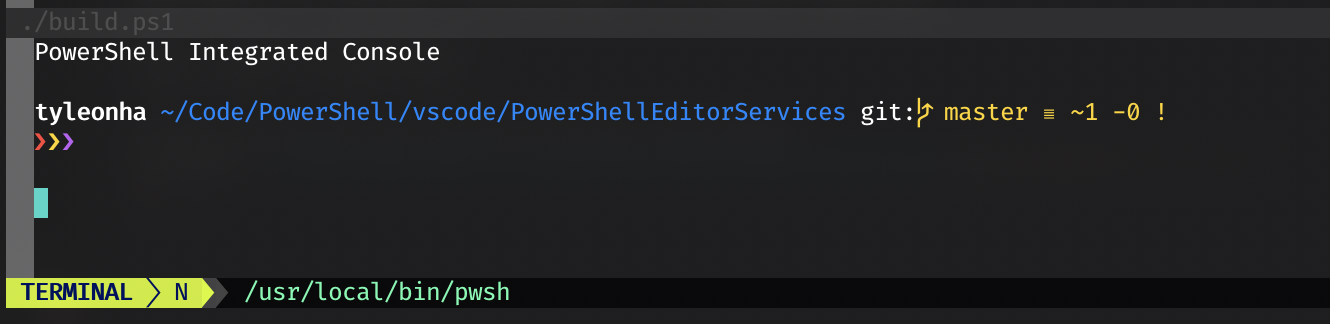
The PowerShell Extension Terminal uses the host process' stdio streams for console input and output.
|
|
Please note that this is mutually exclusive from using stdio for the Language Server Protocol messages.
|
|
|
|
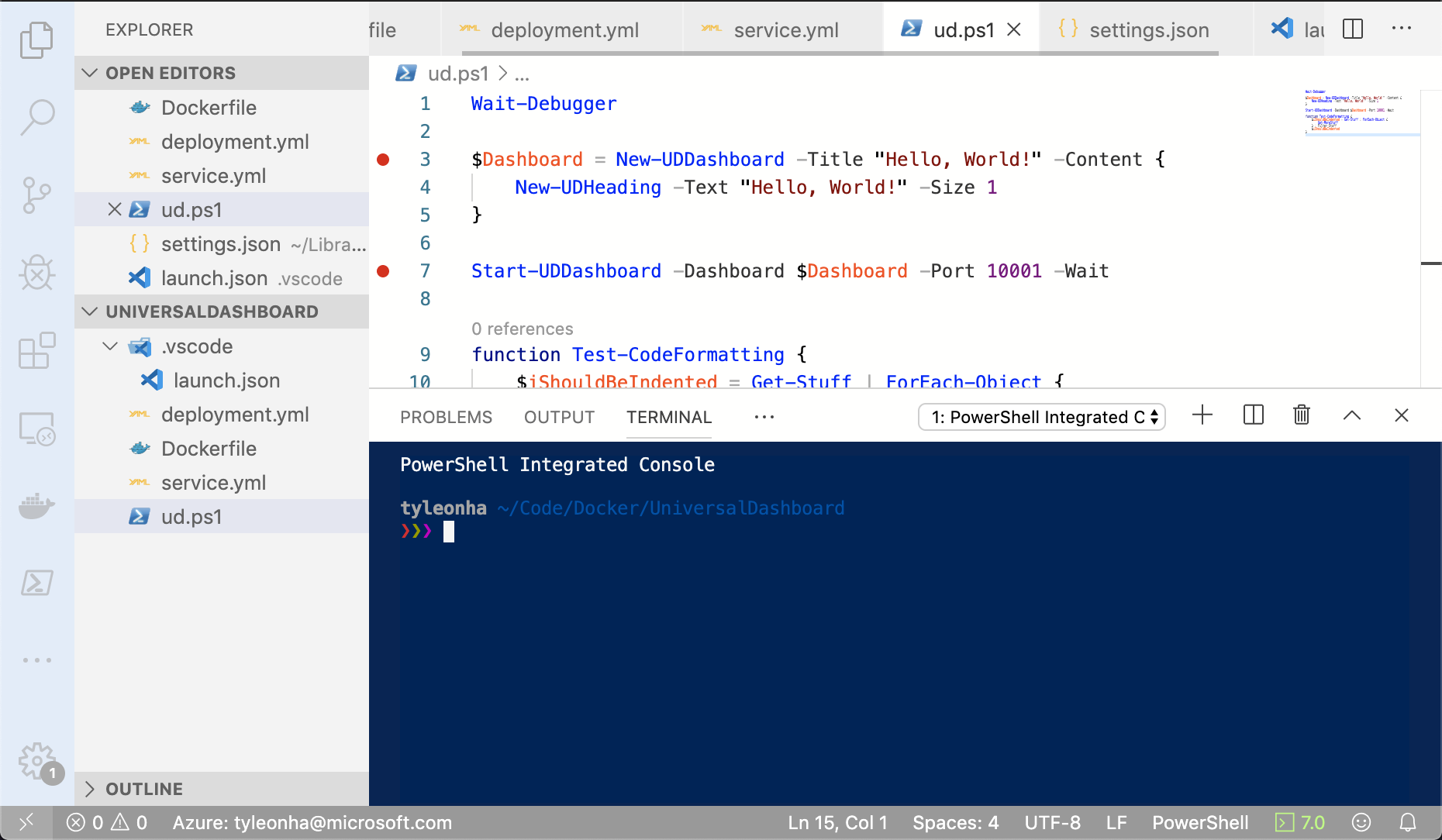
If you want to take advantage of the PowerShell Extension Terminal,
|
|
you must include the `-EnableConsoleRepl` switch when calling `Start-EditorServices.ps1`.
|
|
|
|
This is typically used if your client can create arbitrary terminals in the editor like below:
|
|
|
|
|
|
|
|
The Visual Studio Code, Vim, and IntelliJ extensions currently use the PowerShell Extension Terminal.
|
|
|
|
### Debugging
|
|
|
|
Debugging support is also exposed with PowerShell Editor Services.
|
|
It is handled within the same process as the Language Server Protocol.
|
|
This provides a more integrated experience for end users but is something to note as not many other language servers work in the same way.
|
|
If you want to take advantage of debugging,
|
|
your client must support the [Debug Adapter Protocol](https://microsoft.github.io/debug-adapter-protocol/).
|
|
Your client should use the path to the debug named pipe found in the `session.json` file talked about above.
|
|
|
|
The debugging functionality in PowerShell Editor Services is available in the following editor extensions:
|
|
|
|
- [PowerShell for Visual Studio Code](https://github.com/PowerShell/vscode-powershell)
|
|
- [nvim-dap-powershell for Neovim](https://github.com/Willem-J-an/nvim-dap-powershell)
|
|
- [powershell.nvim for Neovim](https://github.com/TheLeoP/powershell.nvim)
|
|
- [intellij-powershell](https://github.com/ant-druha/intellij-powershell)
|
|
|
|
## API Usage
|
|
|
|
Please note that we only consider the following as stable APIs that can be relied on:
|
|
|
|
- Language Server Protocol connection
|
|
- Debug Adapter Protocol connection
|
|
- Start-up mechanism
|
|
|
|
The types of PowerShell Editor Services can change at any moment and should not be linked against in a production environment.
|
|
|
|
## Development Environment
|
|
|
|
> [!TIP]
|
|
> The easiest way to manually test changes you've made in PowerShellEditorServices is to follow the [vscode-powershell development doc](https://github.com/PowerShell/vscode-powershell/blob/main/docs/development.md).
|
|
|
|
### 1. Install PowerShell 7+
|
|
|
|
Install PowerShell 7+ with [these instructions](https://github.com/PowerShell/PowerShell#get-powershell).
|
|
|
|
### 2. Clone the GitHub repository
|
|
|
|
```powershell
|
|
git clone https://github.com/PowerShell/PowerShellEditorServices.git
|
|
```
|
|
|
|
### 3. Install [Invoke-Build](https://github.com/nightroman/Invoke-Build)
|
|
|
|
```powershell
|
|
Install-Module InvokeBuild -Scope CurrentUser
|
|
Install-Module platyPS -Scope CurrentUser
|
|
```
|
|
|
|
### 4. Adjust `nuget.config` if necessary
|
|
|
|
Our NuGet configuration uses a secure feed with allow-listed third party dependency packages. If your contribution requires any changes to the included NuGet packages, you must disable this secure feed.
|
|
|
|
First, run this command to prevent accidentally commiting changes to this file
|
|
|
|
```powershell
|
|
git update-index --skip-worktree nuget.config
|
|
```
|
|
|
|
Then, either delete the file or remove the `packagesources` section to use nuget.org again. Your PR _will_ fail automated build checks and you _must_ inform us at the top of your PR so the appropriate packages can be added if approved.
|
|
|
|
## Build PowerShell Editor Services
|
|
Now you're ready to build the code. You can do so in one of two ways:
|
|
|
|
### PowerShell
|
|
|
|
```powershell
|
|
PS C:\src\PowerShellEditorServices> Invoke-Build
|
|
```
|
|
|
|
### Visual Studio Code
|
|
|
|
Open the PowerShellEditorServices folder that you cloned locally and press <kbd>Ctrl+Shift+B</kbd>
|
|
(or <kbd>Cmd+Shift+B</kbd> on macOS) which will run the default build task.
|
|
|
|
## Code of Conduct
|
|
|
|
Please see our [Code of Conduct](CODE_OF_CONDUCT.md) before participating in this project.
|
|
|
|
## Contributions Welcome
|
|
|
|
We would love to incorporate community contributions into this project. If you would like to
|
|
contribute code, documentation, tests, or bug reports, please read our [Contribution Guide](CONTRIBUTING.md) to learn more.
|
|
|
|
## Security Note
|
|
|
|
For any security issues, please see [here](SECURITY.md).
|
|
|
|
## Maintainers
|
|
|
|
- Andy Jordan - [@andyleejordan](https://github.com/andyleejordan)
|
|
- Patrick Meinecke - [@SeeminglyScience](https://github.com/SeeminglyScience)
|
|
- Sydney Smith - [@SydneyhSmith](https://github.com/SydneyhSmith)
|
|
- Justin Grote - [@JustinGrote](https://github.com/JustinGrote)
|
|
|
|
### Emeriti
|
|
|
|
- Rob Holt - [@rjmholt](https://github.com/rjmholt)
|
|
- Tyler Leonhardt - [@TylerLeonhardt](https://github.com/TylerLeonhardt)
|
|
- David Wilson - [@daviwil](https://github.com/daviwil)
|
|
|
|
## License
|
|
|
|
This project is [licensed under the MIT License](LICENSE). Please see the
|
|
[third-party notices](NOTICE.txt) file for details on the third-party
|
|
binaries that we include with releases of this project.
|